ASUS
Socket AM5 for AMD Ryzen 9000, 8000 and 7000 Series desktop processors, supporting CPUs up to 170W
AMD B650 chipset with 4 DDR5 DIMM slots, up to 192GB, and DDR5 speeds up to 7600+MHz overclocked, with AMD EXPO support and OptiMem II routing
1 PCIe 4.0 x16 slot, at x16 mode for Ryzen 9000 and 7000 Series processors and x8/x4 mode for Ryzen 8000 Series processors, plus 2 PCIe 4.0 x16 slots at x1 mode
2 M.2 slots and 4 SATA 6Gb/s ports, with the first M.2 slot supporting PCIe 5.0 x4 mode for Ryzen 9000 and 7000 Series processors and the second supporting PCIe 4.0 x4 mode
DisplayPort, VGA and HDMI display outputs, with DisplayPort supporting up to 8K at 60Hz and HDMI supporting 4K at 60Hz
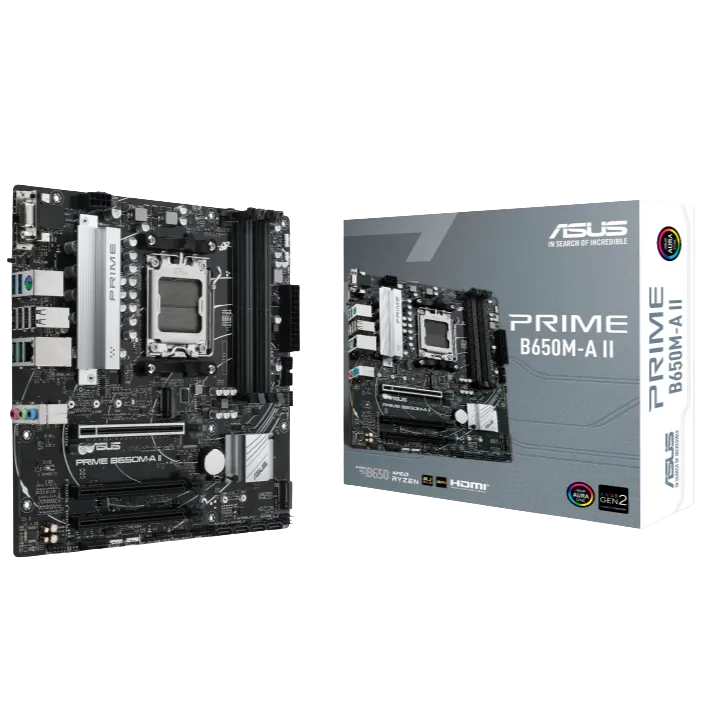
The ASUS PRIME B650M-A II is a Micro-ATX DDR5 board on the AMD B650 chipset for AM5, offering four memory slots, a PCIe 5.0 M.2 slot and three display outputs for versatile Ryzen gaming and productivity builds.
Socket AM5 for AMD Ryzen 9000, 8000 and 7000 Series desktop processors, supporting CPUs up to 170W
AMD B650 chipset with 4 DDR5 DIMM slots, up to 192GB, and DDR5 speeds up to 7600+MHz overclocked, with AMD EXPO support and OptiMem II routing
1 PCIe 4.0 x16 slot, at x16 mode for Ryzen 9000 and 7000 Series processors and x8/x4 mode for Ryzen 8000 Series processors, plus 2 PCIe 4.0 x16 slots at x1 mode
2 M.2 slots and 4 SATA 6Gb/s ports, with the first M.2 slot supporting PCIe 5.0 x4 mode for Ryzen 9000 and 7000 Series processors and the second supporting PCIe 4.0 x4 mode
DisplayPort, VGA and HDMI display outputs, with DisplayPort supporting up to 8K at 60Hz and HDMI supporting 4K at 60Hz
OptiMem II routing is designed to preserve DDR5 signal integrity for higher memory speeds, while the combination of DisplayPort, VGA and HDMI outputs keeps older monitors usable alongside modern displays in a multi-screen workspace.
Install a Ryzen 9000, 8000 or 7000 Series processor within the 170W limit.
Populate the four DDR5 slots for dual-channel memory up to 192GB.
Fit a graphics card in the PCIe 4.0 x16 slot and use the x1-mode slots for add-in cards.
Place the primary NVMe SSD in the PCIe 5.0 M.2 slot and a second drive in the PCIe 4.0 M.2 slot.
Be the first to review this product.
No approved reviews yet.
Sign in to leave a product review. Sign in
